
Appearance
Muscle customization
Three screens behind the Muscle examination.
Regions
The body regions used to group muscles on the Muscle screen. A list with ID and Region name, Active flag, and edit, clone and delete actions; Show Inactive reveals retired regions. Every muscle must belong to at least one region, so add regions before muscles.
Muscle Test Muscles
The muscles that can be tested, listed with their Innervation, Motion and Organ:
| Field | Notes |
|---|---|
| Muscle Name | Required |
| Region | The region(s) it is listed under on the Muscle screen. At least one is required |
| Innervation | The spinal nerve root level supplying the muscle, from standard anatomy references |
| Motion | The movement the muscle performs |
| Organ | The organ relationship, from applied kinesiology and acupressure correlations — optional, for practices that use it |
Add, edit or clone a muscle from the actions on its row. Rather than deleting, mark a muscle Inactive; Show Inactive lists retired muscles so one can be restored by clearing the flag and saving.
Verbiage
The templates that build the muscle test report, chosen by Verbiage Template Group and Style:
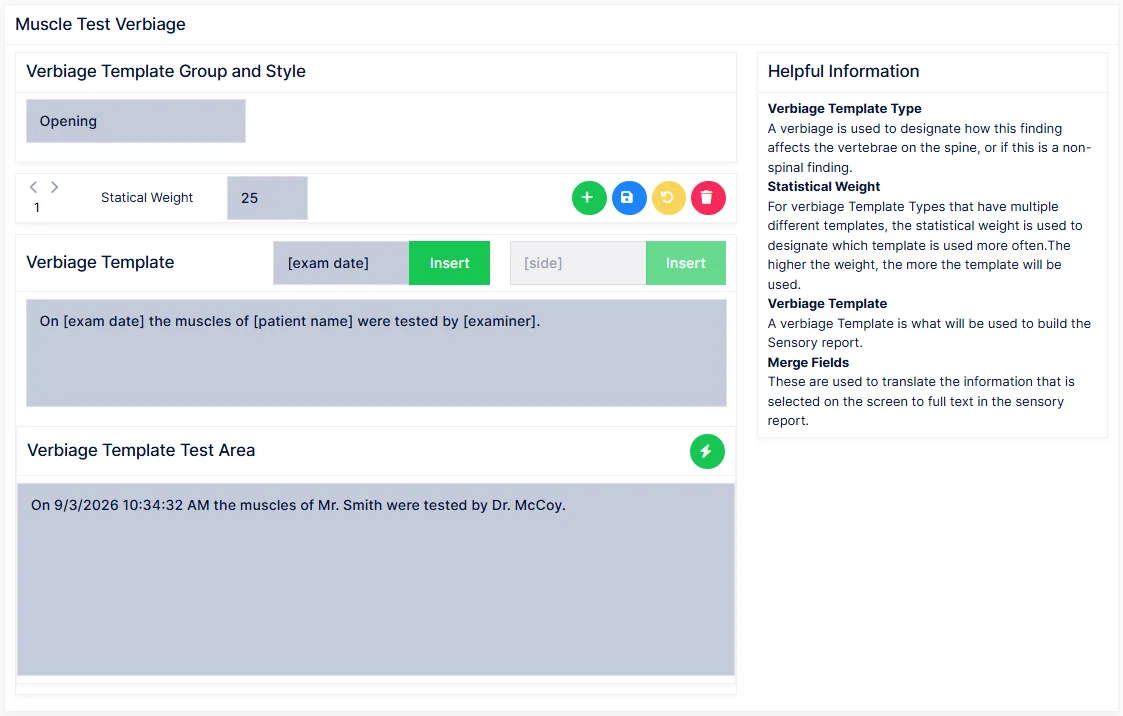
| Group | Writes |
|---|---|
| Opening | The sentence that introduces the test — examiner, patient, exam date, location |
| Dynamometer | Results measured with an instrument, with units |
| StrengthList | The strength grades, as a list |
| Findings | The findings, as sentences |
| AMACloser | The closing statement when the AMA grading scale is used |
Each group can be written in List or Sentence style. Select a group and style, step through the iterations, and edit, add, weight or delete them.
The Merge Fields list offers [exam date], [patient name], [examiner], [location], [side], [muscle], [grade], [servity], [observation], [extended detail], [electric] and [units]. Select one and click Insert; the Test Area shows the result with sample data.
Whether a test reports Strong/Weak only or the detailed AMA grade, and the units for a dynamometer, are set on the Muscle screen's own preferences.