
Appearance
Financial reports
The money reports. They all read the transaction ledger — every charge, payment, adjustment and transfer entered on Transactions and Post Insurance — and classify each line by the accounting code on its Procedure. They need the billing edition.
Unless a report says otherwise it takes the standard date range and provider filters — see how every report works.
Patient versus Insurance columns
Most of these reports split every amount into Patient and Insurance. The split is the transaction's Assigned flag: a charge assigned to insurance counts as insurance, everything else counts as patient. Transfers between the two (co-pay and refused amounts moved to the patient, balances moved to insurance) appear as adjustments so the two columns stay honest.
Financial Statistics
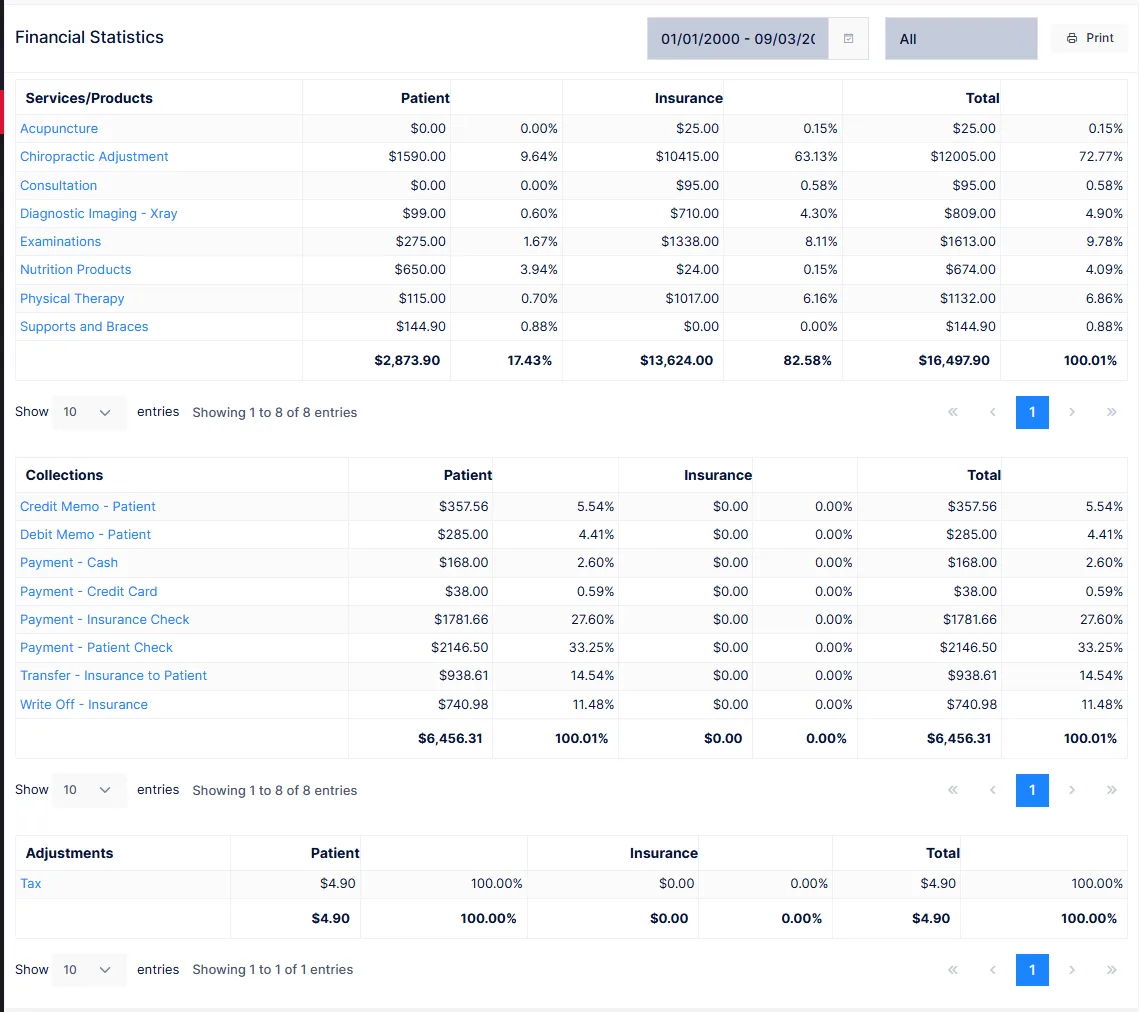
The cash-flow summary for a period, in three tables:
| Table | Rows |
|---|---|
| Services/Products | Charges, one row per procedure category, with Patient, Insurance and Total amounts and each as a percentage of the table |
| Collections | Payments received, by payment category |
| Adjustments | Write-offs, memos, transfers and reconciliations, by category |
Click any category name to open a detail window listing the individual transactions behind it — chart, procedure, description and the Patient / Insurance / Total amounts — so a surprising total can be traced to the entries that made it.
Charges include sales tax where the procedure is taxable.
Practice Statistics
Financial Statistics with the practice-management numbers added underneath. The top half is the same three tables. Below them:
| Section | Shows |
|---|---|
| Total Charges | Patient, Insurance and combined |
| Payments | Cash, Credit Cards, Checks and the total, each split Patient / Insurance |
| Adjustments | Write Offs, Credit Memos, Debit Memos, Transfer to Insurance, Patient Balance Reconciled, Transfer to Patient – CoPay, Transfer to Patient – Refused, and the total |
| A/R and Collection Ratio | The period's receivable and the ratio of collections to charges plus adjustments |
| New patients by Account Type | Count and percentage of patients admitted in the period |
| Appointments by Status | Count and percentage of appointments by outcome |
The A/R here is a period figure
Practice Statistics works out receivables from the charges, payments and adjustments in the date range — it is the movement for the period, not the practice's total outstanding balance. For the balance owed today, use Account Receivable or Receivable by Account Type.
Payment by Account Type
Every payment received in the range, grouped by the patient's account type, so you can see where the money came from.
| Column | Shows |
|---|---|
| Name | Patient, with chart number |
| DOS, Provider | The date of service the payment applies to, and the provider |
| Status | The patient's status |
| Remarks | The remark entered with the payment |
| Pat, Ins, Total | Patient payment, insurance payment, and the sum |
Receivable by Account Type
Outstanding balances today, summed by account type: the patient balance, the insurance balance and the total for each, with a grand total at the foot. This reads the balances on the patient accounts, so there is no date range — only the provider filter.
Use it for the one-line answer to "how much are we owed, and by whom" — cash patients versus insurance, personal injury versus workers' comp.
Account Receivable
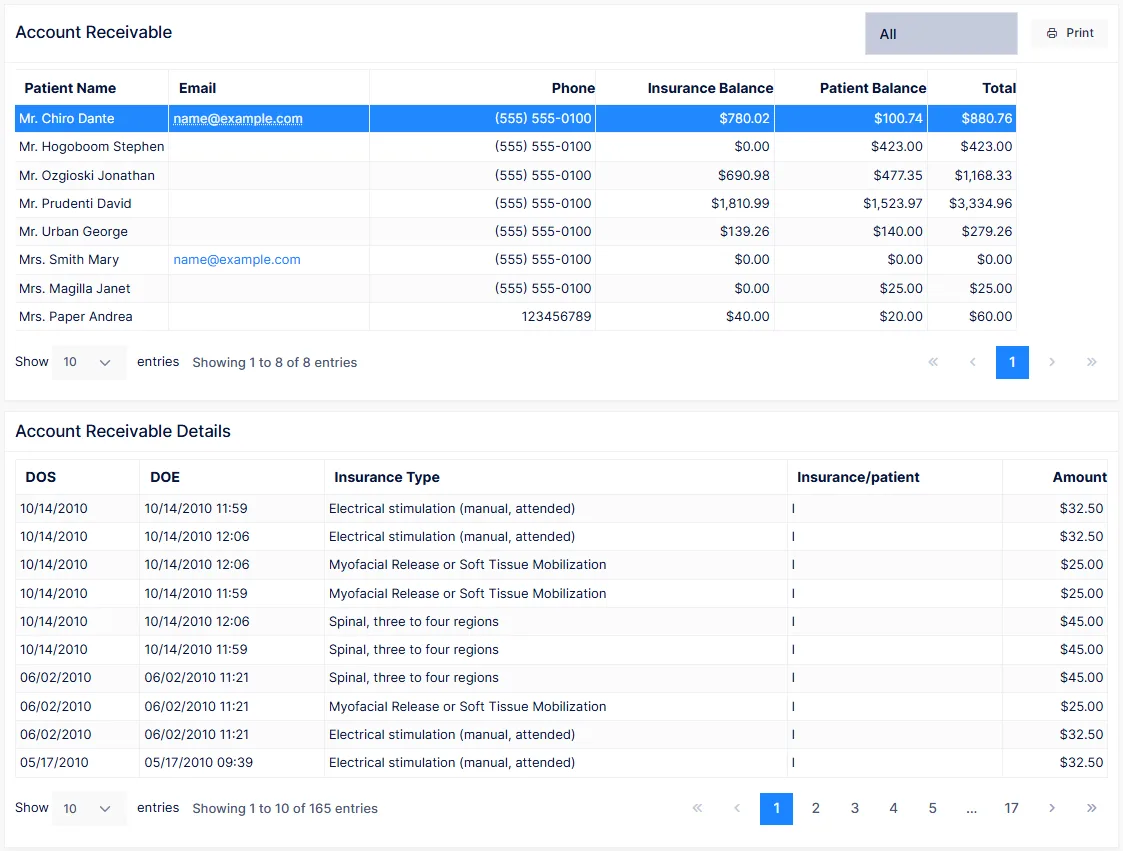
The same question, patient by patient. Provider filter only.
| Column | Shows |
|---|---|
| Patient Name, Email, Phone | Who, and how to reach them |
| Insurance Balance, Patient Balance, Total | What is owed, and by whom |
Click a patient to open the Account Receivable Details panel below the table: each open charge with its date of service, date of entry, whether it is an insurance or patient responsibility, and the amount. That is the itemised statement behind the balance.
Transaction Recap
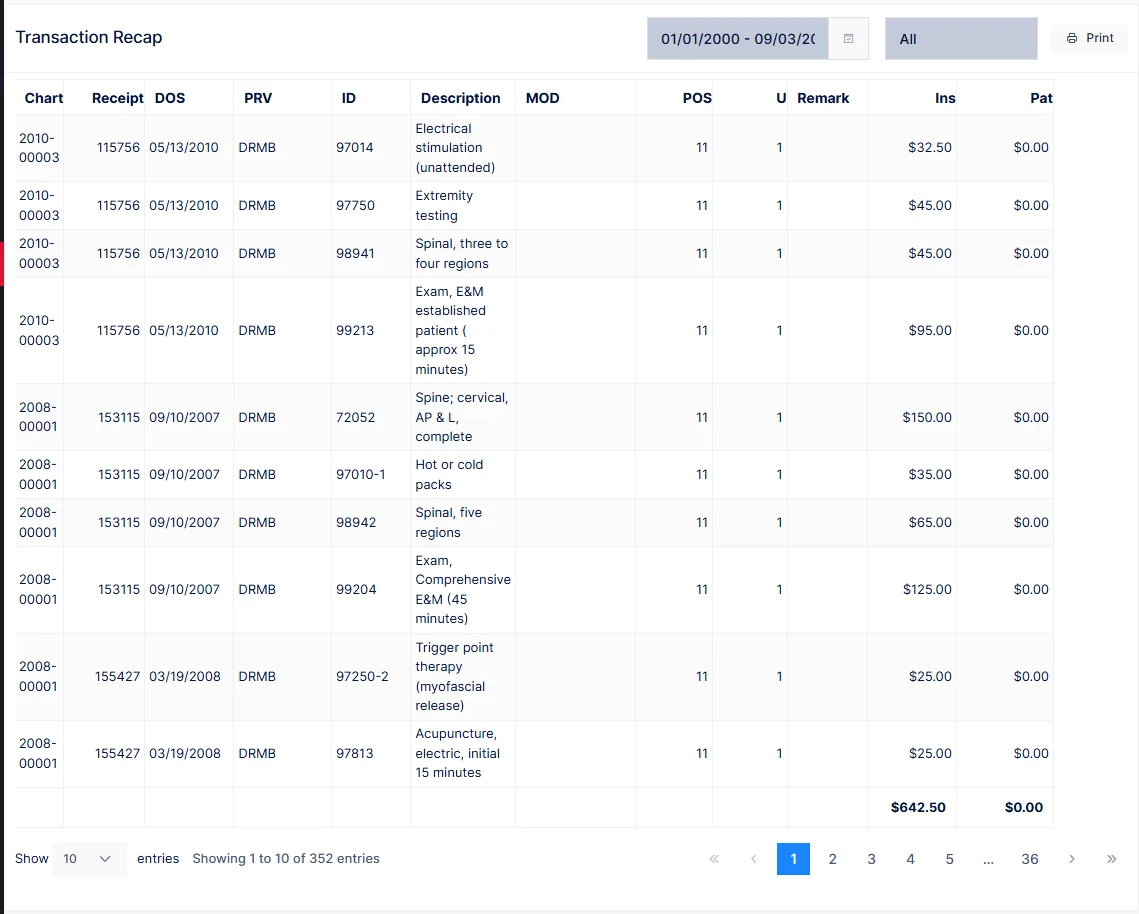
The day sheet. Every transaction line entered for dates of service in the range — charges, payments, adjustments, on both the patient and insurance side — in the order they were entered.
| Column | Shows |
|---|---|
| Patient, Chart | Who |
| Receipt | The receipt number, derived from the time of entry |
| DOS | Date of service |
| PRV | Provider |
| ID, Description | The procedure |
| MOD, POS, U | Modifier, place of service and units |
| Remark | The remark on the line |
| Ins, Pat | The amount on the insurance side and on the patient side |
Run it for one day at a time
Most practices run the recap at close of business for that day and file it. For a single day it is already long; for a month it is very long. Use the Search box to find one patient's entries rather than scrolling.
Transaction Recap Summary
The recap reduced to totals: one row per category — Services, Co Pay, payments by type, adjustments — with the Patient, Insurance and combined amount for the range. The report to reconcile the day's takings against the bank deposit.
Service by CPT
Which services and products are actually being delivered. One row per procedure charged in the range:
| Column | Shows |
|---|---|
| ID, Description | The procedure |
| CPT% | This procedure's share of all units charged in the range |
| Type | Service or product |
| Qty | Units charged |
| Patient, Insurance, Total | Amounts charged |
Click a procedure to see every charge behind it — date of service, price, chart, patient, quantity and the amounts.
Carriers watch this ratio too
A practice that bills the same handful of codes on nearly every visit stands out. If one code's CPT% is far ahead of the rest, make sure the documentation supports it.
CPT Code Not in Use
Active services and products that carry a CPT code but have not been charged in the last 60 days. The date range filter does not apply — the 60-day window is fixed.
| Column | Shows |
|---|---|
| Id, CPT Code, Description | The procedure |
Use it to tidy the Procedure catalog: anything here that the practice has genuinely stopped providing can be set Inactive so it stops cluttering the pick lists.
Sales Tax
Taxable sales for the range, one row per provider, for the sales tax return:
| Column | Shows |
|---|---|
| Exempt Sales | Charges for non-taxable items |
| Taxable Sales | Charges for items marked taxable in the Procedure catalog |
| Pre-Tax Total | The two combined |
| City Tax Billed, State Tax Billed | Tax added to the taxable charges |
| Grand Total | Everything billed including tax |
Tax rates come from the procedure and the rates in force when the charge was entered, so a change to the tax rate does not restate earlier periods.