
Appearance
Procedure
The Procedure catalog holds everything that can appear on a transaction: services, products, and the accounting codes used for payments, credits and debits.
Nothing can be charged until it exists here, so this catalog has to be populated — with fees — before the practice can bill anything.
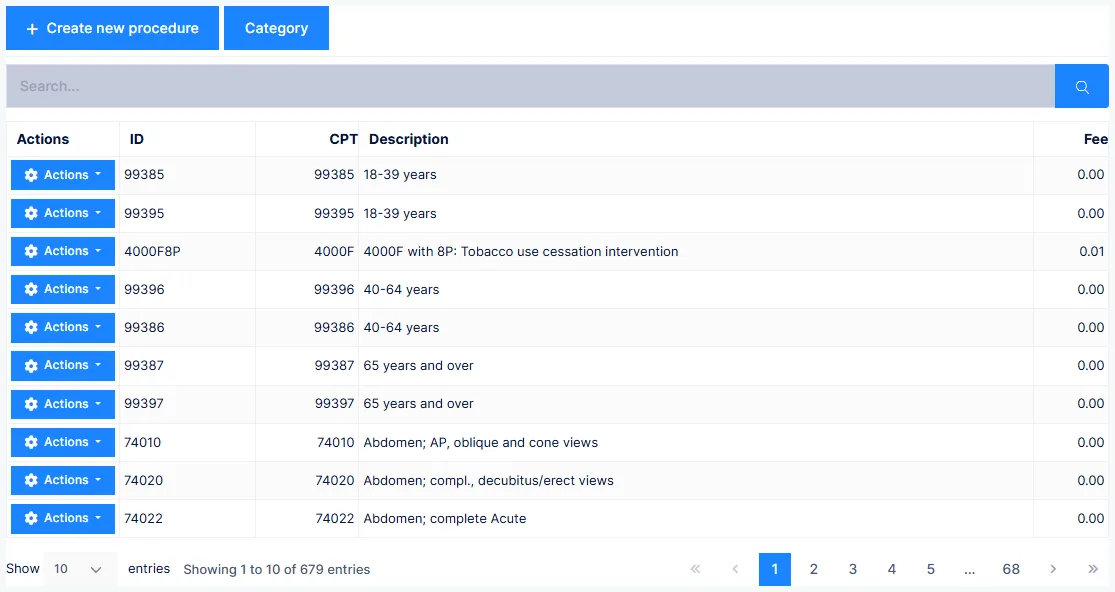
The grid lists ID, Description, CPT and Fee.
Identification
| Field | Notes |
|---|---|
| ID | The code staff type on a transaction. Permanent once saved |
| Status | Inactive removes it from use in patient files |
| Description | Flows to statements, claims and the patient ledger |
| Category | Groups the item, and determines whether it is a service or a product |
Changing a Description changes it everywhere
It appears on the transaction report, patient statements and insurance claims — including for history already recorded.
A category can only be deleted when nothing is assigned to it.
Fees and discounts
| Field | Notes |
|---|---|
| Fee/Unit Cost | What the practice charges. This is the amount that goes to claims and statements |
| TOSR Discount | A time-of-service reduction, in dollars |
TOSR is deliberate, never automatic
The discount applies only when someone clicks the TOSR button on the transaction, and only to the procedure it was set on. There is no prompt and no reminder. Set it up on the services where you might want it, and tell staff when to use it.
The fee submitted is your standard fee regardless of the patient's account type. Carrier allowables are handled separately, in that carrier's Intelli$ense fee schedule.
Billing codes
| Field | Notes |
|---|---|
| CPT | The procedure code |
| Modifier | Only when it applies universally — see below |
| Place of Service | CMS-1500 box 24B |
| Type of Service |
No CPT means no payment
Without a CPT code the item will not appear on the claim, the statement, or the patient ledger — and insurance will not pay it.
Where a modifier belongs
Put it on the procedure only if it applies 100% of the time, for every carrier. If it varies by carrier, use that carrier's Intelli$ense fee schedule. If it varies by visit, use the Mod column on the transaction.
Place of Service and Type of Service lists are set by the government and are not editable.
Billable To
Controls who can be billed for the item — Third Party, Patient, or Either.
Medicaid-only services must be Third Party
Where a service is provided only to Medicaid patients, Medicaid law prohibits billing the patient. Setting Third Party means the charge can never be routed to them.
Tax and inventory
Flag the item Taxable and, where a tax rate is set on the provider record, ChiroPad adds the tax as a separate line on the ledger.
For products, Quantity on Hand decreases with each sale, and Trigger Reorder When Qty is Below drives the low-inventory report. Inventory only works when the item's category is classified as a Product.
Visitometer
Disable Visitometer for this Procedure stops a transaction containing only this procedure from counting as a visit — for a supplement pickup, say, where no care was given.
Treatment plans and macro codes
Macro codes are built here, from the Treatment Plans view. Each one bundles a set of services and products so they can be entered together in one action from the On-Demand Macros tab on a transaction.
Give each a code, a description, a colour, the number of time slots it occupies, and the number of units.
These are the billing-side plans
Macro codes created here are for appointments and transactions. Clinical modalities are set up separately, in the clinical customization area.