
Appearance
Carrier
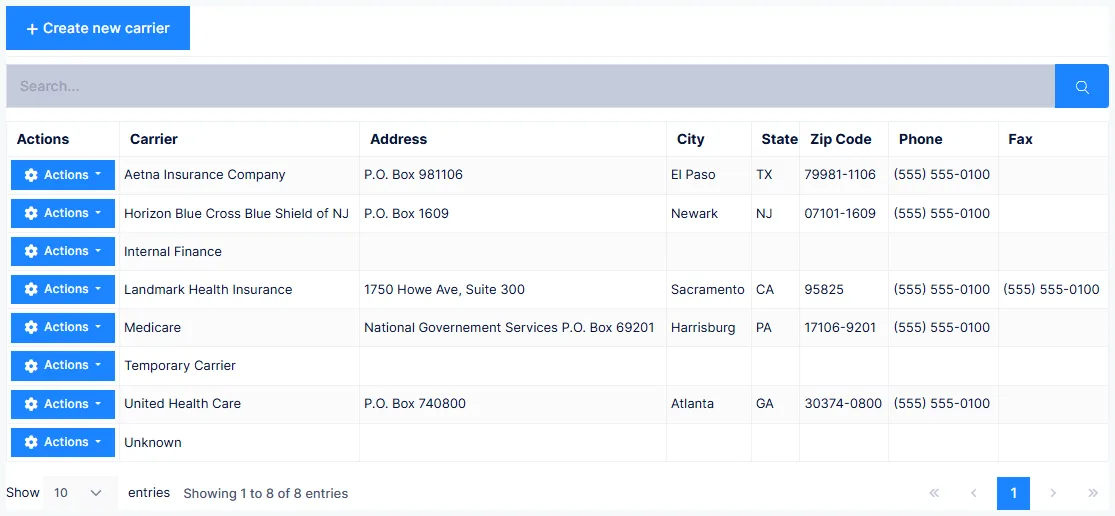
The Insurance Carriers catalog holds each carrier you bill, along with the rules for how their claims are built. It is the largest catalog in ChiroPad, and the one where getting details right translates most directly into getting paid.
Everything here affects every patient on that carrier
Carrier settings are global. A change made while looking at one patient's claim applies to every patient covered by that carrier. Use the Patients button to see exactly who that is before changing anything.
Identification
| Field | Notes |
|---|---|
| ID | Up to 10 characters, permanent once saved, internal only |
| Status | Inactive means the carrier can no longer be selected for a patient |
| Carrier | The name exactly as you want it printed on forms |
| Payor ID | The electronic-claims routing number |
| Full Name | A contact person at the carrier — usually best left blank |
| Address, City, State, ZIP, Phone, Fax | Mainly for paper claims |
| Notes | Internal only, never printed |
No Payor ID means no electronic claims
Without it you cannot submit electronically to this carrier. Worse, some clearing houses will accept the claim, print it, mail it on paper, and bill you substantially for doing so.
Full Name is not the adjuster
A claims examiner or adjuster who handles one patient belongs on that patient's policy, not here. This field is for a carrier-wide contact, and most of the time should be empty.
What the tabs do
| Tab | Controls |
|---|---|
| General | Carrier identity and contact details |
| CMS Form | What prints in boxes 9, 13, 19, 24e, 24i, 24j, 25, 32b and 33b |
| Date Options | Two- or four-digit years, and date separators |
| Font Options | Print fonts for paper claims |
| Claim Options | Fine-tuning of claim production per carrier |
| Medicare | Medicare-specific completion rules |
| Intelli$ense (button) | Classification, policy defaults, fee schedule, non-covered categories |
Signatures
Box 13 — patient. On File is the usual choice and prints "signature on file". Original requires the patient to sign every printed form.
Check your state on electronic authorisations
Some states require the authorisation on paper; others accept an electronic copy as equally valid. Verify locally before relying on On File.
Whichever you use, scan the signed authorisation into the patient's file so you can produce it on request without hunting for paper.
Box 31 — provider. Your signature asserts the charges are true and accurate. Name simply prints the provider's name, which some carriers accept and others reject. On File should only be used when the carrier has told you in writing they hold your signature.
Leave Use Claim Created Date on so the claim date prints under the signature.
Diagnosis pointing — box 24E
This is the single highest-leverage setting in the catalog.
Diagnosis pointing decides whether services are bundled together or separated by diagnosis. Bundled, carriers pay against the lowest-paying benefit in the group.
Why it matters, concretely
If adjustments and physical therapy are performed on the same day and every diagnosis points at every service, the carrier applies the most restrictive benefit — often spinal manipulation, capped at perhaps 4 to 8 visits a year. Point each service at the diagnosis it actually addresses and the therapy charges are assessed under the therapy benefit instead, which may allow up to 75 visits.
| Option | Behaviour |
|---|---|
| Use SmartPointer rules | True diagnosis pointing — a pointer worked out per service line |
| Use actual DX count | Most common. Pointers reflect the diagnoses actually present, but still bundles everything |
| Custom | Fixed pointers, for carriers that permit only one diagnosis |
| 1, 2, 3, 4 (ignore count) | Always prints four pointers |
Two options will get claims rejected
1, 2, 3, 4 (ignore DX count) prints four pointers regardless of how many diagnoses exist — if there are fewer than four in box 21, claims are rejected.
Use ICD code from DX 1 is obsolete. CMS-1500 rules require only the numbers 1–4 in box 24E, so an ICD code there triggers rejection.
A pointer typed into the Dx Rel column on a transaction overrides this setting for that line.
Box 25 — tax ID
Choose whether the provider's SSN or EIN prints. The value comes from the Provider catalog.
Always choose the EIN
An Employer ID is far harder to exploit for identity theft than a Social Security Number.
Box 19 — Reserved for Local Use
A picker of placeholders determines what generates into box 19.
Always select Subluxation Level
Not for its original purpose — Medicare no longer wants subluxation levels in box 19, they belong in the SOAP notes. Select it because it is the enable flag for the box 19 text field on the patient's policy. Leave it unselected and anything typed there silently never reaches the claim.
It is also how Medicaid explanation codes such as Y-Pregnant get into box 19.
Other placeholders cover the X-ray date, exam codes, taxonomy numbers, and moving ICD codes from box 21 into box 19 for carriers that want them there. ChiroPad supports up to 12 active ICD codes.
Text typed directly into the box 19 field, rather than chosen as a placeholder, becomes a global entry — it prints for every patient on this carrier, 100% of the time.
Medicare
Medicare requires the form completed a very specific way
The supplied settings are what get most practices paid. The exception is a non-participating provider: set box 29 to Always and uncheck box 30 so the balance due prints.
Medicare requires you to show how treatment is substantiated — either a PART exam documented in your SOAP notes, or an X-ray taken within the last 13 months.
For PART, use only the letters for aspects actually examined on the dates billed. At least two letters, one of which must be A or R.
Paper Medicare claims: font size must be 10–12
Medicare measures the font in boxes 1 to 33. Smaller than 10 or larger than 12 and the claim is rejected. No other carrier currently measures fonts.
Intelli$ense
The carrier's fee schedule and policy defaults.
General sets the claim type — which populates CMS-1500 box 1 — along with default co-pay and deductible, and the maximum service lines per claim (1 to 6, normally 6).
Fee Schedule, per procedure:
| Column | Effect |
|---|---|
| Use CPT | Bill this carrier under a different code |
| Use M | A modifier always applied for this carrier |
| Allow | The allowable amount |
| Co-Pay | Patient responsibility, as % or $ |
Allow drives an automatic write-off
Entering an allowable does not change the fee you submit. When the claim is produced, ChiroPad writes off the difference between your fee and the allowable, so the balance due becomes the allowable amount.
Leave Co-Pay blank on most carriers
Only set it when patients on this carrier never have secondary insurance. The co-pay moves the remaining balance to patient responsibility — and if a secondary payment then arrives, it cannot be posted correctly.
Service & Product Categories marks categories this carrier never pays. Those charges become patient responsibility and are never sent. Bill Even When Not Covered still submits them, so a secondary carrier gets an EOB.
Copying settings between carriers
Both Claim Options and the Medicare tab can copy their settings to other carriers. Save first — the copy button only becomes available once the settings are saved.
When to change any of this
If claims are being paid, leave it alone
Change these settings only when the carrier tells you something must appear differently. If payments slow down, ask the carrier what they want changed rather than experimenting — every change here affects every patient on the carrier.