
Appearance
Insurance Manager
Where claims are produced for the whole practice. Post Insurance works one patient's claims at a time; this screen creates claims across every patient, shows you who is blocking them, and outputs the files and forms that go to carriers.
Two tabs: Pre-Billing and Claim Registry.
Pre-Billing — who is being held
Pre-Billing lists patients for whom a claim cannot be produced, because something the claim needs is missing.
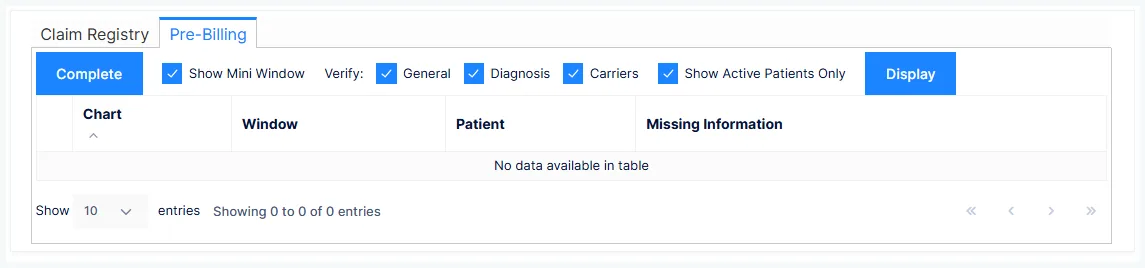
| Column | Shows |
|---|---|
| Chart and Patient | Who |
| Window | Which screen the problem is on |
| Missing Information | What, specifically |
Three Verify toggles choose what is checked — General (patient demographics), Diagnosis, and Carriers (policy detail) — and Show Active Patients Only trims the list to current patients. Click Display to run the check.
Nothing errors — the claim just never appears
This is the one place a missing field makes itself known. Leave a policy's insured ID blank and no screen complains; the patient simply turns up here, and no claim is created until it's fixed.
Check Pre-Billing before creating claims, not after wondering why a patient's visits didn't bill.
The usual causes, and where to fix them:
| Missing | Fix on |
|---|---|
| Insured's ID, policy group, employer/school name, or plan name | Policies — all four are mandatory |
| Subscriber details when the patient isn't the subscriber | Policies — or tick Ignore Missing Subscriber Information if you genuinely can't get them |
| No active diagnosis | Assessment |
| Demographics the claim form needs | Patient Info |
To fix one, select the row and click Complete — ChiroPad opens the screen named in the Window column, for that patient, with the missing field in front of you. With Show Mini Window ticked (the default) it opens as a compact popup rather than a full tab, so you fix it, close it, and Display again to watch the row drop off.
Claim Registry — creating claims
Create Claim builds claims for every visit not yet billed, across all patients, using the filters in the create panel:
| Filter | Narrows to |
|---|---|
| Provider | |
| Carrier | All carriers, or a single one |
| Date range | Dates of service |
| Due greater or less than an amount |
Display shows what would be created; Create creates it, and reports how many claims and the total.
The "less than five dollars" filter
The amount filter exists mainly for collections judgement. If chasing a $4.99 balance costs more than it recovers, create claims for Due greater than $5.00 and let the rest go — a deliberate policy rather than an accident.
How visits become claims
- A claim covers one patient, one carrier, and — where the carrier is set up for individual claims — one provider
- Lines per claim follow the carrier's Min/Max Items in Intelli$ense (up to 6 for a paper CMS-1500); electronic 837P claims aren't capped
- The claim's form type is whatever the patient's policy says — claims are created the same way regardless, and the form type only decides how they are output
- A policy whose Cycle is Hold still gets its claims created, but they are stored rather than output — for a litigation case you want ready when the attorney asks. A form type of No Print produces no claims for that policy at all
Claim Registry — outputting claims
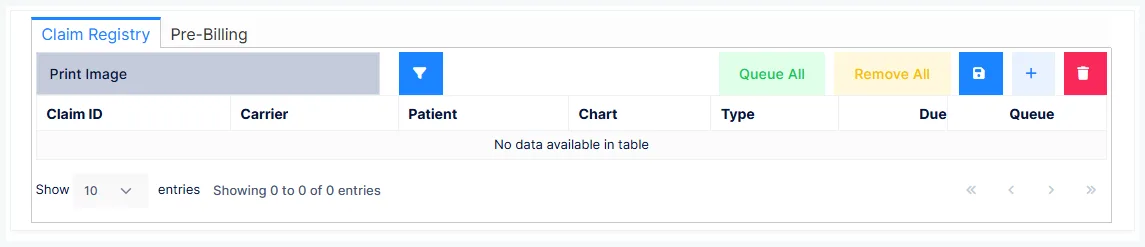
Choose the form type at the top and the grid lists that type's open claims:
| Form type | What it produces |
|---|---|
| ANSI X12 837P | An electronic claim file to upload to your clearing house — EDI Website takes you there |
| CMS 1500 (02-12) | The paper form, previewed as a PDF to print |
| New York C4 (10-15) | The New York workers' compensation forms |
| Print Image | A plain-text file for clearing houses that still take that format |
CMS-1500 (08-05) is listed but marked obsolete — don't use it for new claims.
A carrier with no Payor ID cannot be billed electronically
The Payor ID on the carrier's catalog record is what routes an electronic claim. Without it the 837P cannot be submitted — and some clearing houses will quietly drop the claim to paper and charge you for the mailing.
Medicare measures the font on paper claims
Medicare rejects a paper CMS-1500 whose text falls outside 10 to 12 point in boxes 1–33. No other carrier checks this, which is why it catches practices that print Medicare claims on a form set up for someone else.
| Column | Shows |
|---|---|
| Claim ID, Carrier, Patient, Chart | |
| Type | The form type |
| Due | The claim balance |
| Queue | Whether it is queued for output |
Save Claim file writes the 837P or print-image file; Save NY-C4 file does the same for New York forms. Both land in the practice's Output folder in the File Manager.
New York: first claim on C4.0, everything after on C4.2
The first workers' compensation claim for a patient must go on the C4.0, and every later one on the C4.2 — claims on the wrong form are denied on the technicality. The switch is a manual setting on the patient's policy; flip it as soon as the first claim is created.
Attaching SOAP notes
Where a carrier wants the notes with the claim, tick ChiroPad Notes on the patient's policy. For paper claims, ChiroPad prints the notes after the forms; for 837P claims, it merges the matching notes into an attachment that travels with the file.
If a claim goes electronically, the onset date has to be real
A gradual onset entered as 11-11-1111 prints the word GRADUAL on a paper CMS-1500 — and is rejected automatically by electronic clearing houses. Use a real date on any policy that submits as 837P or print image.
Deleting a claim
Delete Claim removes a claim and returns its visits to not billed, so they can be picked up by the next Create Claim.
Only for a claim created in error and never sent
Deleting a submitted claim destroys its billing history, and any payments already applied against it have to be re-entered by hand. If a submitted claim is wrong, correct the policy and relock it on Post Insurance instead.
After submission
Every submission is logged with its date, carrier, form type and who sent it — the Submission History on the claim, reachable from Post Insurance — and that log is your proof of timely filing when a carrier says otherwise.
Where a policy has a next carrier set, posting the primary's payment prompts you to send the remainder on. Claims over 15 days old can carry tracer text if the policy's Trace Patient is ticked.
Don't re-bill a secondary the primary already forwarded
Medicare and some other payers cross claims over to the secondary themselves. For those, the carrier's Do Not Reprint When Secondary To setting records the secondary's balance without outputting a second claim — and when the remittance comes back marked crossed over, that is your confirmation it went. Billing the secondary again duplicates it.
The weekly rhythm
Pre-Billing first, fix what's held, Create Claim, output each form type, upload the 837P file, print the paper. Then Remittance when the payers answer.