
Appearance
Treatment Plan customization
Nine screens behind the Treatment Plan screen. Four of them — Modalities, Regions, Visit Status and Phase — are the lists a plan is built from, each with its own verbiage. The goal screens supply the templates for goals and timeframes. Treatment Plans links modalities to billable procedures.
Modalities, Regions, Visit Status and Phase share one layout: a listing on the left with Show Inactive, Add and Clone, and on the right the item's name, mnemonic, Inactive flag, Weight and verbiage iterations. Regions, Visit Status and Phase can be dragged into the order they should appear on the plan.
Modalities
Every service and product the practice provides — adjustments by region, therapies, supports, supplements. A modality can only be documented on a plan if it is on this list, and every state board and federal program requires that every service provided be documented on every visit.

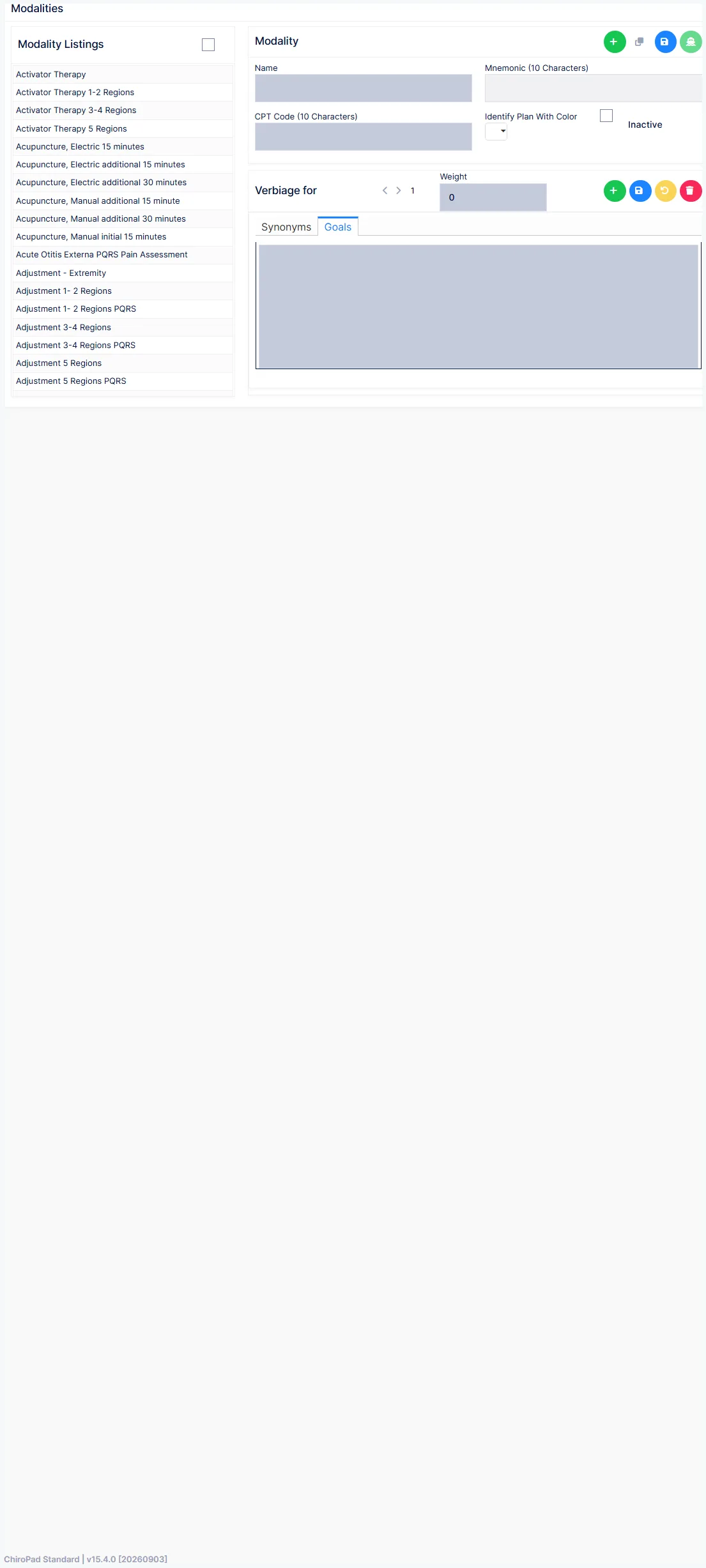
Beyond the common fields a modality carries:
| Field | Notes |
|---|---|
| CPT | The code, for matching to a procedure |
| Color | The colour the modality shows in on the plan |
| Synonyms tab | Alternative wordings for the modality's name, used interchangeably in the note |
| Goals tab | The goals offered when this modality is on the plan |
| Procedure in Plans | Shows the procedures linked to the modality — the link itself is made on Treatment Plans |
Reactivate before you create
The shipped list is long and includes many PQRS and measure entries. Tick Show Inactive and search before adding a modality; it is usually there, retired.
Regions
The body regions a modality can be applied to. Required documentation, with verbiage for each.
Visit Status
When the next visit should be, or at what frequency — "three times a week for two weeks", "as needed". Chosen on every plan and written into the note.
Templates
The overall plan sentence templates — the wording that frames the plan in the note. Select the template, step through its iterations, and edit, weight, add or delete them.
Phase
The phase of treatment — acute, corrective, supportive and so on. A Medicare requirement, a legal requirement in some states, and an insurance requirement everywhere else.
Some states dictate the phase names
Check the state board's wording before renaming a phase. Where the state prescribes the names, use them exactly.
Goal Templates
The sentence template that merges a complaint, its goals and the estimated date of attainment for the general timeframe — for example "The general goals to be met for {complaint} are {goals}. We expect the goal to be attained on or about {estdate}." Enter several iterations so the sentence varies.
Goal ADL Templates
The short-term timeframe template that merges the patient's ADL list with the forecast and percentage improvement:
| Field | Inserts |
|---|---|
{ADL_List1} | Each ADL with its current grade and forecast grade |
{ADL_List2} | Each ADL with its percentage improvement, and the overall improvement |
{ADL}, {patient}, {his} | The activities, the patient, and the pronoun |
ADLs are graded 0 (normal) to 10 (greatly restricted); the template's job is to turn the numbers into a sentence. The ADL list itself is maintained under Subjective → Activities of Daily Living.
Goal Items
The individual goals that can be attached to a modality — reduce pain, restore range of motion, return to work. A plain list: Name, with add, edit, clone and delete.
Treatment Plans
Where a modality becomes a charge. A treatment plan is a macro: one code that enters one or more procedures on the Transactions screen at once. Every modality is a treatment plan; plans can also be created here for macro codes that exist only for billing.
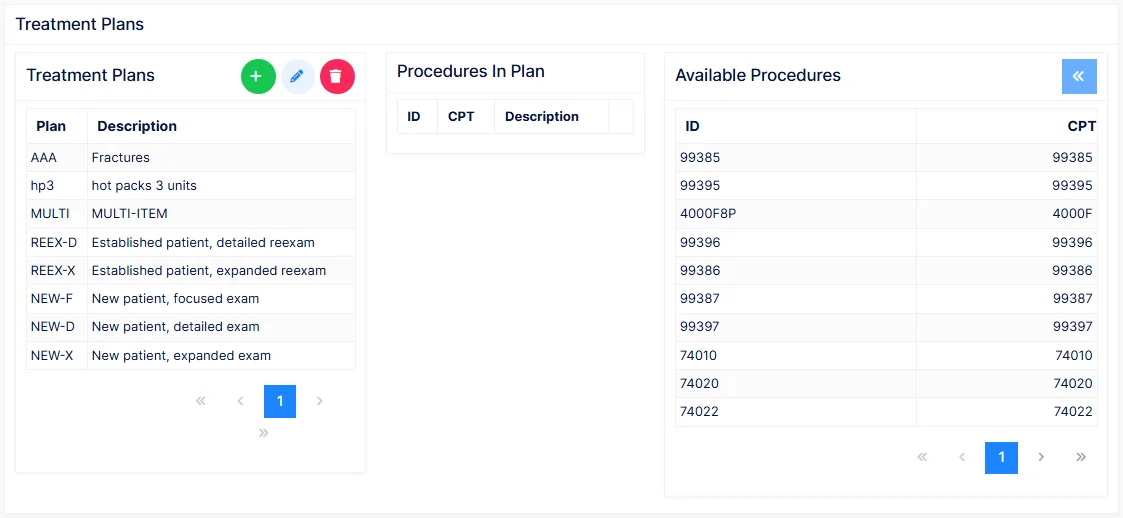
The screen has three parts:
| Part | Holds |
|---|---|
| Treatment Plans | The plans — Plan code, Description, and the Slot count |
| Procedures In Plan | The procedures the selected plan generates — ID and CPT |
| Available Procedures | Every billable item in the Procedure catalog, with filters on ID, CPT and description |
Select a plan, select a procedure on the right, and use the arrow to add it to the plan; select one in the plan and use the other arrow to remove it. A plan holds up to eight procedures.
A modality with no procedures bills nothing
This link is what makes the doctor's plan generate charges at checkout. A modality with an empty Procedures In Plan documents the service in the note and puts nothing on the transaction. After adding a modality, come here and attach its procedure.
If a procedure is missing from Available Procedures it must first be added to the Procedure catalog.