
Appearance
SOAP Notes customization
Three short lists that shape the SOAP note as a document rather than its clinical content: who signs it, how it is categorised, and what wording is substituted after it is generated.
Each is a simple table with Add, edit and delete actions and a search box.
Initials
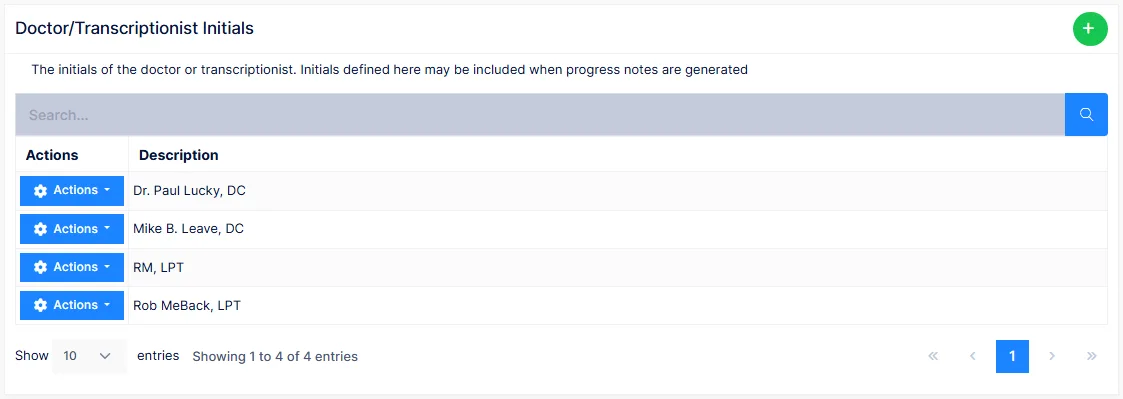
The list of signatures that can be applied to a generated note. Each entry is the text that prints at the end of the note as the provider's electronic signature.
Medicare wants a name, not initials
The screen is called Initials because that is all it once held. Medicare and state boards now require the provider's full name and credentials on every note. Enter each provider as "Jane Q. Smith, DC", not "JQS".
The entry can also be made on the provider's record in the Provider catalog, which is the better place for it. A provider's default initials for generation are chosen in Preferences → SOAP Note; the Use Extended Format option there controls whether the full entry is used.
Categories
The categories a SOAP note can be filed under when it is generated — Initial, Progress, Re-exam, Discharge, and whatever else the practice needs. The category appears beside each note's date on the Documents screen, and the Visit Recap report groups notes by it.
Categorising notes is optional but worth doing consistently: it is the quickest way to find the initial or the last re-exam among a long run of progress notes.
Find and Replace
A list of word substitutions applied to every note as it is generated: whatever is in the Find column is replaced by the Replace column throughout the text.
Two uses:
- Correct a spelling the generator produces that the practice prefers otherwise.
- Replace a term with the one the practice uses — "adjustment" for "manipulation", say.
Substitutions apply only to notes generated after they are entered; existing notes are not changed. Delete a row to stop it.
Keep the list short and specific
A substitution matches anywhere the text occurs, including inside longer words. "pain" → "discomfort" will also turn "painful" into "discomfortful". Prefer whole, distinctive terms.